Quick answer
Suspicious chat? Don’t reply, pay or click links. Open the chat, tap the person’s name or profile picture, then Report, or Block > Block and report. Paid through Messenger? Open the chat > their profile picture > Report > choose the problem > Submit report. Our tip: also contact your bank or card provider. Scam detection warns you about new chats with signs of a scam; manage it in Privacy & safety > Scam detection.
Does this match what you see?
- A new contact pushes you to pay, invest, or click a link.
- Someone asks for a code, password or “verification”.
- You paid for something through Messenger and never got it.
AndroidiPhone & iPadComputer (browser)
Based on Messenger Help “Scam detection for suspicious chats on Messenger” and “How to report suspicious or fraudulent payments on Messenger”, supplied by the site owner on November 11, 2026, plus our own Android screenshots. Meta says payments on Messenger may not be available in your region.
Why this happens: the possible causes
Which tool fits. Our own summary of Meta’s pages.
| Situation | Where to go |
|---|---|
| A chat looks like a scam | Block and report |
| You paid through Messenger payments | Report the payment |
| Messenger flagged a new chat | Scam detection |
- A new connection you don’t knowCheck this first
Meta says scam detection looks at recently created chats with new connections.
Try these 60-second checks first
- Check your Message requests and Spam folder, where messages from strangers usually land.
How to fix it, step by step
Work through these in order. They start with the quickest, safest checks and only move to steps that sign you out or remove data later.
Fix 1: Report and block a scammer
Meta says you can report a message or a whole conversation that’s spam or goes against its Community Standards. The report steps are Meta’s, the same on iPhone and Android; the Block and report wording is from our Android screenshots.
- Report one message: open the chat, tap and hold the message > More > Report, choose a category, then Submit report.
- Report the whole conversation: tap the chat name at the top, scroll down and tap Report, choose a category, then Submit report.
- Block: on the same screen, tap Block. On Android in November 2026, the confirmation also offered Block and report, and said: “We won’t tell them you blocked or reported them.”
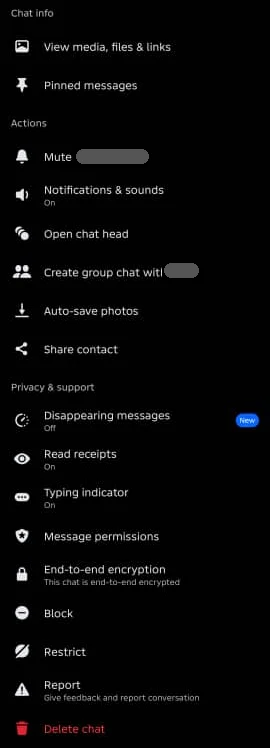
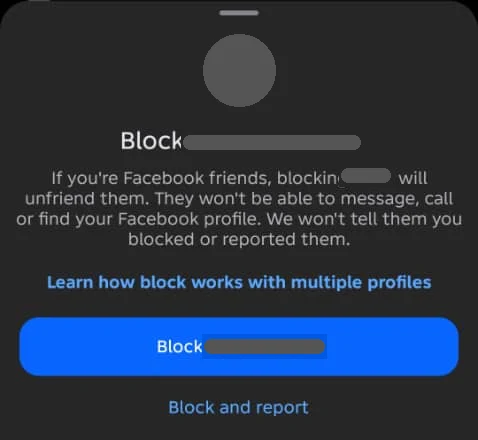
Meta says it reviews up to 30 of the most recent messages in a reported conversation. If the chat is end-to-end encrypted, recent messages are forwarded securely to Meta for review. Meta says reports aren’t created for technical problems or fake news, and not everything upsetting breaks its rules. If you or someone else is in immediate danger, Meta says to contact local law enforcement. More on blocking: block someone on Messenger.
Did it work? The chat is blocked, and you’ve submitted a report.
Did Fix 1 solve it?
Great, you fixed it with Fix 1. Tell us it worked, or bookmark this page in case it happens again.
Fix 2: Report a scam or fraudulent payment
Meta says if you buy something using payments on Messenger, you can report a person or business for scams, fraudulent charges or other suspicious activity.
iPhone & iPad
- Open Messenger and the chat with the person or business.
- Tap their profile picture in the top left.
- Scroll down and tap Report.
- Tap the problem you want to report.
- Tap Submit report, then Done.
Android
- Open Messenger and the chat with the person or business.
- Tap their profile picture in the top left.
- Scroll down and tap Report.
- Tap the problem you want to report.
- Tap Submit report.
Meta says buying with payments on Messenger is rolling out over time and may not be available in your region, and to only send money to businesses you know and trust. Our note: this report covers purchases made with payments on Messenger. If you paid by bank transfer, a card outside Messenger, gift card or crypto, contact your bank or provider straight away and still report the account in the chat. Meta’s page doesn’t promise refunds.
Did it work? You’ve submitted the report.
Did Fix 2 solve it?
Great, you fixed it with Fix 2. Tell us it worked, or bookmark this page in case it happens again.
Fix 3: Use (or turn off) scam detection
Meta says scam detection uses technology on your device to tell you if a recently created chat with a new connection may contain signs of a scam, so end-to-end encrypted chats stay secure.
- If Messenger warns you about a chat, it asks whether to send the recent messages you received for AI review.
- If a potential scam is found, Meta shows why the messages may be a scam and suggests actions, such as blocking or reporting.
- To turn it off: go to Privacy & safety > Scam detection, tap the switch next to Scam detection, then Turn off.
Meta says messages you share for AI review are no longer end-to-end encrypted. Our note: our Android test account’s Privacy & safety screen (November 2026) didn’t show Scam detection yet, so it may not have reached every account or region.
Did it work? Our check: you see the setting in Privacy & safety, on or off as you want.
Did Fix 3 solve it?
Great, you fixed it with Fix 3. Tell us it worked, or bookmark this page in case it happens again.
Where scam messages usually land
Messages from people you’re not connected with go to Message requests. On Android in November 2026, it had You may know and Spam tabs and said: “They won’t know you’ve seen their message until you reply.” Our tip: don’t reply to a stranger just to ask who they are. Report or delete instead.
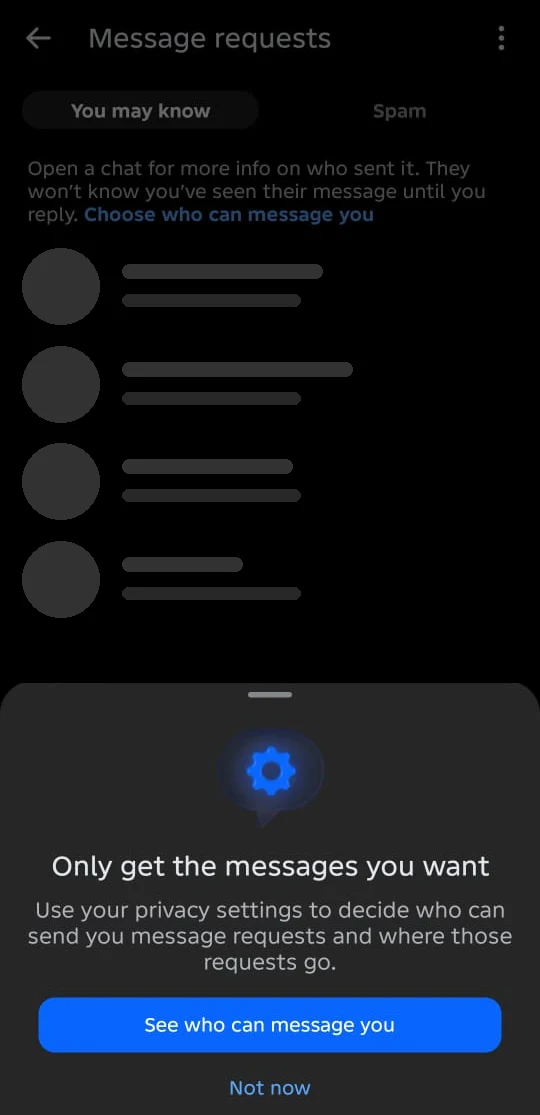
Tired of strangers? Set Others on Messenger or Facebook to Don’t receive requests: see choose who can message you.
Saved a card? Add a payment PIN
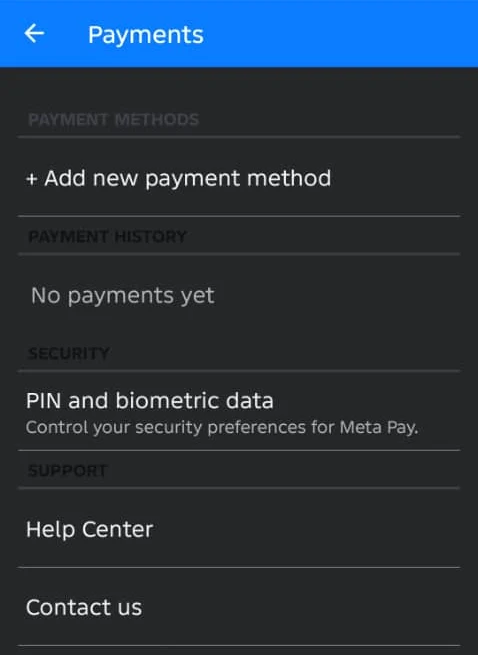
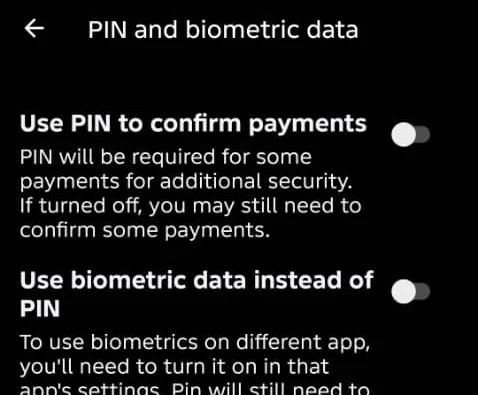
On Android in November 2026, Settings > Payments > PIN and biometric data had Use PIN to confirm payments. The screen says: “PIN will be required for some payments for additional security. If turned off, you may still need to confirm some payments.” See payments and orders in Messenger.
Red flags to watch for
Our tips, not Meta’s wording:
- A new contact who quickly moves to money: investments, crypto “balances”, prizes, loans or a job that needs a fee.
- Someone claiming to be Meta or Facebook support in a chat, asking you to log in through a link or share a code.
- A friend suddenly asking for money or a code in an unusual way. Call them on another channel to check; their account may be hacked.
- A buyer or seller who wants to move off Messenger or pay outside the usual method. See Marketplace scams.
Not sure about a message? Paste it into our Scam Message Checker to see which warning signs it has, with the official guidance behind each one.
How to know it worked
- You’ve blocked and reported the account, and haven’t sent money or codes.
Still not working? Your next steps
- Think your own account was taken over? See Facebook hacked account.
- Someone offering to “recover” your account or money for a fee? See account recovery scams.
Official help routes
SocialAppFix can’t see or change your account. For account decisions, recovery and appeals, only the platform’s own tools can help. These links go to the official sites.
- Messenger Help: Scam detection for suspicious chats on MessengerFacebook Help Center (external site, opens in a new tab)
- Messenger Help: Report a message or conversation on MessengerFacebook Help Center (external site, opens in a new tab)
- Messenger Help: How to report suspicious or fraudulent payments on MessengerFacebook Help Center (external site, opens in a new tab)
Frequently asked questions
How do I report a scam on Messenger?
Report one message by tapping and holding it > More > Report, or the whole conversation by tapping the chat name > Report. Choose a category and tap Submit report.
How many messages does Meta review when I report a Messenger chat?
Meta says up to 30 of the most recent messages in the reported conversation.
How do I report a fraudulent payment on Messenger?
On iPhone, iPad or Android, Meta says open the chat, tap their profile picture, tap Report, choose the problem and tap Submit report.
What is scam detection on Messenger?
Meta says it uses on-device technology to warn you if a recently created chat with a new connection may show signs of a scam, and can send recent messages for AI review if you agree.
Does Messenger scam detection read my encrypted chats?
Meta says detection happens on your device, so encrypted chats stay secure, but messages you choose to send for AI review are no longer end-to-end encrypted.
How do I turn off scam detection on Messenger?
Meta says go to Privacy & safety > Scam detection, tap the switch, then Turn off.
Can I get my money back after a Messenger scam?
Our note: Meta’s page explains how to report, not refunds. Contact your bank or card provider straight away.
Did this solve your problem?
Your answer stays in your browser — nothing is sent or stored. The “tell us” link opens your own email app.
Out of date or didn’t work? Email us — never include passwords or codes.
Sources and how we checked this guide
We base steps on the platforms’ own help pages and the phone makers’ official guides. Menu names change often and can differ by device, app version and region. Where a platform page could not be independently read, we link it so you can check the current wording yourself.
- Report a message or conversation on Messenger (external site, opens in a new tab)
- Scam detection for suspicious chats on Messenger (external site, opens in a new tab)
- How to report suspicious or fraudulent payments on Messenger (external site, opens in a new tab)
Last reviewed 11 November 2026 by the SocialAppFix editorial team against the sources above. Next scheduled review: 11 February 2027. Editor: Michael Michael. How we write and review guides.
What changed
- 11 November 2026: Linked the new Scam Message Checker.
- 11 November 2026: First published.
- 11 November 2026: Added Meta’s steps to report a message or a conversation.
SocialAppFix is an independent guide and is not affiliated with or endorsed by Meta or Messenger. We never ask for passwords, login codes or payment to fix an account.