Quick answer
Meta says running out of storage may cause Messenger to crash, so delete large files or unused apps first. Then update Messenger (and iOS on iPhone or iPad), and if it still crashes, uninstall and reinstall it. Before reinstalling, make sure you know your password and your encrypted chat PIN or backup. Meanwhile, use messenger.com in a browser. Still broken? Shake your phone to report the problem to Meta.
Does this match what you see?
- Messenger closes as soon as you open it.
- The app freezes, goes blank or keeps crashing.
- Messenger won’t download or update from the App Store or Google Play.
- The Messenger desktop app for Mac or Windows no longer works.
- The Facebook app keeps asking you to install Messenger.
iPhone & iPadAndroidComputer (browser)
Based on Meta’s Messenger Help pages on troubleshooting the app, app crashes, downloading or updating, and reporting a problem (iPhone, iPad, Android and computer versions). Menus can vary by app version.
Why this happens: the possible causes
What Meta points to when the app itself misbehaves.
| What you see | What it usually means | Do this first |
|---|---|---|
| Crashes when you open it | Low storage or an old app version | Free up storage |
| Won’t update or download | Connection, storage or store problem | Can’t update |
| Desktop app stopped working | Meta retired the Mac and Windows app | Use messenger.com |
| Still crashes after updating | Damaged install | Reinstall |
- Not enough storageCheck this first
Meta says running out of storage may cause the app to crash.
- An out-of-date app or systemCheck this first
Meta says installing the latest version may fix problems, and on iPhone or iPad to install the latest iOS.
- A damaged installPossible
Meta suggests uninstalling and reinstalling if crashes continue.
- A wider outageLess likely
Our note: if friends see the same problem at the same time, it’s likely on Meta’s side. Wait and try again.
Try these 60-second checks first
- Close Messenger fully and restart your phone.
- Check your internet works in another app or website.
- Try messenger.com in a browser to see if your account works.
How to fix it, step by step
Work through these in order. They start with the quickest, safest checks and only move to steps that sign you out or remove data later.
Fix 1: Free up storage
Meta says running out of storage may cause the app to crash.
iPhone & iPad
- Open Settings > General > iPhone Storage to see what’s using space.
- Remove large files or apps you don’t use.
- Open Messenger again.
Android
- Open Settings > Storage to see what’s using space.
- Remove large files or apps you don’t use.
- Open Messenger again.
Did it work? Messenger opens and stays open.
Did Fix 1 solve it?
Great, you fixed it with Fix 1. Tell us it worked, or bookmark this page in case it happens again.
Fix 2: Update Messenger (and iOS)
Meta says installing the latest version may fix problems.
iPhone & iPad
- Open Messenger on the App Store (external site, opens in a new tab) and tap Update if it shows.
- Meta also says to install the latest version of iOS (Settings > General > Software Update).
Android
- Open Messenger on Google Play (external site, opens in a new tab) and tap Update if it shows.
Meta says for best results, connect to Wi-Fi before downloading.
Did it work? The store shows Open instead of Update, and the app works.
Did Fix 2 solve it?
Great, you fixed it with Fix 2. Tell us it worked, or bookmark this page in case it happens again.
Fix 3: Uninstall and reinstall Messenger
Meta suggests this if the app keeps crashing after you free storage and update.
iPhone & iPad
- Tap and hold the Messenger app, tap Remove app, then Delete app and Delete to confirm.
- Reinstall it from the App Store (external site, opens in a new tab) and log in.
Android
- Go to your phone’s Settings, open your application manager (often Apps), tap Messenger, then Uninstall and OK.
- Reinstall it from Google Play (external site, opens in a new tab) and log in.
An older Meta page describes the previous iPhone steps (tap and hold until the app jiggles, then tap -). Our note: before reinstalling, check you know your password and your encrypted chat PIN or backup.
Did it work? Messenger opens, and your chats load after you log in.
Did Fix 3 solve it?
Great, you fixed it with Fix 3. Tell us it worked, or bookmark this page in case it happens again.
Messenger won’t download or update
Meta’s checklist:
- Check your internet: test whether other websites load.
- Make sure you have enough storage.
- Install any system updates for your phone.
- Confirm the app is available for your device.
- Delete and reinstall the app.
Android only: Meta also suggests deleting data you don’t need (such as large files or unused apps) to make space, updating the Google Play Store app, and signing out of your Google account on the phone and back in.
Messenger not working on a computer
Meta says the Messenger desktop app for Mac and Windows is no longer available. On a computer, use messenger.com in a web browser. Meta also says that if the phone app won’t work, you can still chat at messenger.com.
If messenger.com won’t load or work properly:
- Reload the page and check you’re still logged in.
- Try a private or incognito window. If it works there, a browser extension or stored data is likely the cause.
- Clear the browser’s cache and cookies for Facebook and Messenger (this signs you out).
- Update your browser, or try a different one.
- If the browser works but the phone app doesn’t (or the other way round), the problem is with that device, not your account.
Our note: those browser steps are general troubleshooting, not Meta’s own list.
Why the Facebook app keeps asking you to install Messenger
Meta says that when you check messages in the Facebook app on your phone, you’re asked to install Messenger for extra features such as free text, calls and video over your data plan, push notifications and blocking messages from specific people. After you install it, your messages and contacts are in the app. To read messages without it, Meta says go to facebook.com in a browser.
Messenger suddenly dark (or light)?
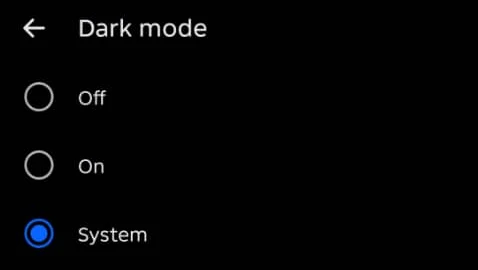
On Android in November 2026, Menu > Settings > Dark mode offered Off, On and System. The screen says that with System, “Messenger will automatically adjust your appearance based on your device’s system settings,” so it can switch when your phone does, for example at night.
Still broken? Report the problem to Meta
Meta says to update the app first. If something still isn’t working, report it as a broken feature. Abuse is reported separately.
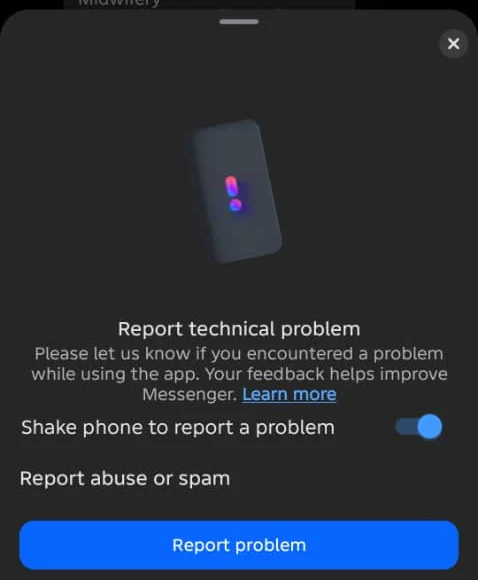
- Shake your phone on the screen with the problem, then tap Report problem (on iPhone, Continue below Report a technical problem; you can also tap Add Media to attach screenshots). Meta’s iPad steps don’t include shaking; use Settings instead. (To stop this, shake your phone and turn off Shake phone to report a problem.)
- Or in the app: Menu > Settings > scroll down > Report technical problem (iPhone and iPad: Report a problem) > Report anyway. On messenger.com: click your photo (bottom left) > Report a problem > Report anyway.
- During a call: tap Options (top right) > Technical problem > Report anyway (iPhone and iPad: Report a technical problem > Continue).
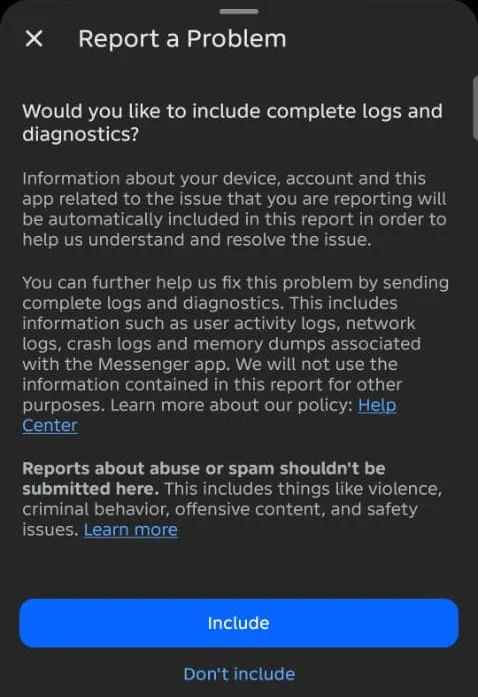
- Choose whether to include logs and diagnostics.
- Describe the problem, including what you expected, what happened and the steps that cause it, then tap Send (or Submit on messenger.com).
On Android in November 2026, a chat’s ⋮ menu also had Report technical problem. The sheet includes a Shake phone to report a problem switch (turn it off if the shake prompt keeps popping up) and a separate Report abuse or spam option. The logs screen says: “Reports about abuse or spam shouldn’t be submitted here.”
Meta says details and screenshots help, and that it doesn’t reply to every report but may contact you. If it keeps happening, Meta suggests reporting again as soon as you see it, explaining how to reproduce it, and checking the Help Center in case the feature is working as intended.
How to know it worked
- Messenger opens, stays open and loads your chats.
Still not working? Your next steps
- Not sure if the app is down for everyone? Run the Is it down or just me? tests.
- Use messenger.com while you wait for a fix, and report the problem.
- Calls crashing rather than the whole app? See Messenger calls not working. The Facebook app crashing too? See Facebook app keeps crashing.
Official help routes
SocialAppFix can’t see or change your account. For account decisions, recovery and appeals, only the platform’s own tools can help. These links go to the official sites.
- Messenger Help: Troubleshoot your Messenger appFacebook Help Center (external site, opens in a new tab)
- Messenger Help: Troubleshoot app crashes on MessengerFacebook Help Center (external site, opens in a new tab)
- Messenger Help: Download or update your Messenger appFacebook Help Center (external site, opens in a new tab)
- Messenger Help: Report a problemFacebook Help Center (external site, opens in a new tab)
Frequently asked questions
Why does Messenger keep crashing?
Meta says running out of storage may cause the app to crash. Free up space, update Messenger (and iOS), then uninstall and reinstall if it continues.
Is there still a Messenger app for Mac or Windows?
No. Meta says the Messenger desktop app is no longer available. Use messenger.com in a web browser.
Why can’t I update Messenger on Android?
Meta suggests freeing space, reinstalling from Google Play, updating the Google Play Store app, and signing out of your Google account on the phone and back in.
Will reinstalling Messenger delete my messages?
Your account stays, but encrypted chat history may need your Messenger PIN or backup to restore. Our note: check before you delete the app.
How do I report a problem with Messenger?
Meta says shake your phone on the screen with the problem, or go to Menu > Settings > Report technical problem (Report a problem on iPhone and iPad).
Did this solve your problem?
Your answer stays in your browser — nothing is sent or stored. The “tell us” link opens your own email app.
Out of date or didn’t work? Email us — never include passwords or codes.
Sources and how we checked this guide
We base steps on the platforms’ own help pages and the phone makers’ official guides. Menu names change often and can differ by device, app version and region. Where a platform page could not be independently read, we link it so you can check the current wording yourself.
- Troubleshoot your Messenger app (external site, opens in a new tab)
- Troubleshoot app crashes on Messenger (external site, opens in a new tab)
- Download or update your Messenger app (external site, opens in a new tab)
- I’m having trouble updating my Messenger for Android app (external site, opens in a new tab)
- Why you’re being asked to install the Messenger app (external site, opens in a new tab)
- Report a problem with the Messenger app (external site, opens in a new tab)
- How to check the storage on your iPhone and iPad (external site, opens in a new tab)
- How to manually update apps from the App Store (external site, opens in a new tab)
Last reviewed 7 November 2026 by the SocialAppFix editorial team against the sources above. Next scheduled review: 7 May 2027. Editor: Michael Michael. How we write and review guides.
What changed
- 11 November 2026: Added Android Report technical problem screens. Added the Android Dark mode setting.
- 7 November 2026: First published. Crashing, reporting, computer and install-prompt sections moved here from Messenger not sending messages, with the download and update checklists.
SocialAppFix is an independent guide and is not affiliated with or endorsed by Meta or Messenger. We never ask for passwords, login codes or payment to fix an account.